Command, Option, and Everything In Between: Seven Mechanical Keyboards That Get macOS Right
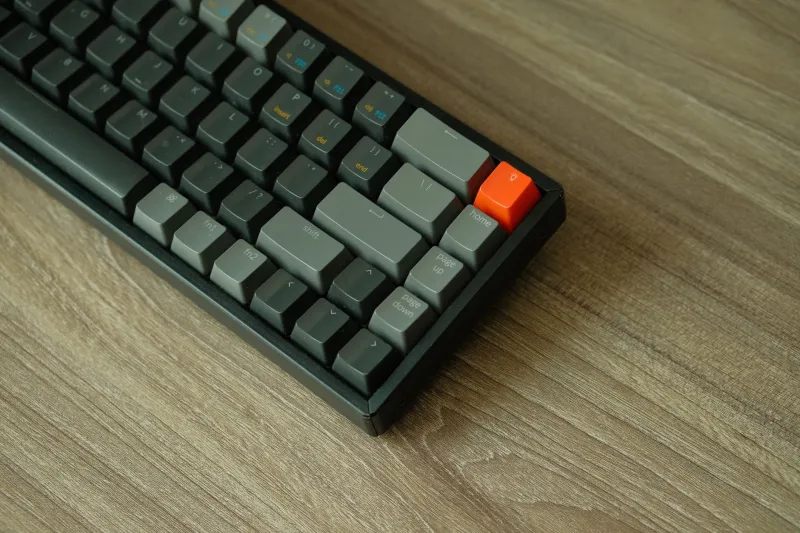
Mechanical keyboards and Macs have an on-again, off-again relationship. For years the deal was simple: if you wanted a great typing feel, you accepted a Windows-first board with the Command key sitting where your thumb expects Option, plus a handful of shortcuts that quietly stopped working. That's mostly over in 2026. Mostly.
We've spent the last several months rotating boards through a MacBook Pro on a Thunderbolt dock and a Mac mini on a plain USB-C cable, running the current macOS release and doing actual work — long-form writing, VS Code, Slack, and one genuinely miserable spreadsheet that took three days. Two of the seven below will cost you a Saturday afternoon of setup. Five won't. Here's how they stack up.
How we tested
Every board got at least two weeks of daily use, split between Bluetooth and wired. We graded on out-of-box modifier placement, whether the keycaps carried real Mac legends, the quality of the remapping software, wake-from-sleep reliability, and whether the shortcuts you actually live on — Command-Tab, Command-backtick, Control-Option-Space, Command-Shift-4 — survived contact with the hardware.
We didn't grade on RGB, and we didn't grade on how the board looks in a photo. Sorry.
What actually matters before you spend a dime
Legends and modifier order
Apple's bottom row reads Control, Option, Command, Space. A Windows board sends the same HID codes, but the physical order lands as Control, Command, Option — so your thumb keeps reaching for the wrong key. Some manufacturers fix this with a firmware mode switch. Others just throw a bag of spare Mac keycaps in the box and wish you luck. Both approaches are fine; silence is not.
Where the remapping lives
QMK and VIA are the gold standard because the remap lives on the keyboard itself and travels with it between machines. Vendor apps are a mixed bag — Keychron Launcher and NuPhyIO are perfectly usable, Logi Options+ is fine but intrusive, and anything that needs a Windows-only installer to change a layer is an automatic disqualification in this house.
Profile and switch weight
We'll dig into this below, but the short version: profile changes how far your fingers travel, and switch weight changes how tired your hands are at 5 p.m. Neither is a spec-sheet flex. Both matter more than the case material.
The shortlist
1. Keychron Q1 Pro — best overall ($199) Gasket-mounted, CNC aluminum, 75% layout, and QMK/VIA out of the box with Mac legends printed on the keys and a physical Mac/Windows toggle on the back edge. Ours arrived with Gateron Jupiter Browns; if you type for a living, drop in something around 45g and thank us later. It's heavy enough to stay put and the knob is genuinely useful for volume. Nothing else at this price gets this much right without a firmware adventure.
2. NuPhy Air75 V3 — best low-profile ($129) Roughly 7mm thin at the deck, which means it slides into a laptop sleeve next to a 14-inch MacBook Pro without adding a bulge. Bluetooth to three devices, Mac legends standard, and the firmware now supports proper remapping rather than the vendor-app guessing game of earlier generations. The tradeoff is key travel — short and crisp, not deep and thocky.
3. HHKB Professional Hybrid Type-S — best for terminal dwellers ($349) Sixty keys, no number row, dip switches on the bottom to swap Command and Control, and that unmistakable Topre feel. This is a board you either fall in love with in a week or return in three days. If you live inside tmux, it's the endgame. If you live inside Excel, it's a hostage situation.
4. Logitech MX Mechanical Mini for Mac — best plug-and-play ($149) Logitech built this one specifically for Apple hardware: correct legends, correct modifier order, tri-mode connectivity, and a backlight that actually behaves. Pair it, type, done. The catches are that the switches aren't hot-swappable and Logi Options+ is effectively mandatory if you want per-app profiles.
5. Satechi SM1 Slim — best budget with real Mac keys ($99) A 75% low-profile board that ships with Command and Option where you expect them and connects over Bluetooth, 2.4GHz, or USB-C. At under a hundred bucks it's the easiest recommendation for a first mechanical board or a second desk. There's no QMK here, so your remaps live in the vendor app and nowhere else.
6. Lofree Flow — best feel in a thin body ($159) Full aluminum chassis, Kailh Choc switches, and a typing feel that punches well above its profile class. It's the board people pick up off your desk and ask about. Firmware tooling is the weak spot — you'll mostly leave it configured as shipped, which is fine because the shipped config is good.
7. Wooting 60HE+ — best if you also game ($175) Hall-effect analog switches, adjustable actuation, and latency numbers that make competitive players misty. Here's the homework: it's Windows-first out of the box, so you'll be in Wootility building a Mac layer before Command and Option land where your fingers expect. Worth the effort if you split your day between work and games; pure friction if you don't.
Where things get sticky
Two boards on this list — the Wooting and, to a lesser degree, the Lofree — assume you're comfortable poking at firmware or living with the defaults. That's not a knock, it's a category. If you want to plug in and never think about it again, stay in the top half of the list and skip the bottom two.
Worth flagging: Keychron's Mac/Windows toggle is on the back and easy to bump when you're moving the board. If your shortcuts suddenly invert, check that switch before you start reinstalling anything.
Picking profile and switch weight for an eight-hour day
Cherry profile sits lower than OEM and MT3, which means less finger travel and less fatigue over a long session. OEM is the familiar middle ground. MT3 is tall and heavily sculpted — deeply satisfying for some typists and jarring for anyone with shorter fingers. Low-profile Choc switches cut travel even further, which is great next to a laptop and less satisfying if you want that bottom-out thock.
On weight: 35g linears are fast and light but easy to mistype on. 45g is the safe middle for all-day writing. 50–55g tactiles give you a bump you can feel without pounding. Anything north of 60g is for people with heavy hands or very strong opinions. If you share an office or a bedroom, buy silent switches. Nobody has ever regretted it.
Bottom line
The Q1 Pro is the default answer for most Mac users who want a real mechanical board without a project. The Air75 V3 is the one to buy if the board leaves the house. And keep a $20 set of Mac-legend keycaps in a drawer — it's the cheapest quality-of-life upgrade in this entire hobby.